Ideas for making things useful, understandable, and meaningful—from products and interfaces to visual communication.
Good design.
Developed through a lifetime of industrial design at Braun and Vitsœ, Rams’s principles ask us to consider an object’s usefulness, integrity, and place in everyday life.
-
Innovative
Good design uses new technology or ideas meaningfully rather than novelty for its own sake.
-
Useful
Meet practical, psychological, and aesthetic needs; avoid elements that detract from use.
-
Aesthetic
Visual quality matters because people live with products and interfaces daily.
-
Understandable
Clarify the product’s structure and operation; make it self-explanatory where possible.
-
Unobtrusive
Good design is neutral and restrained, leaving space for the user rather than demanding attention.
-
Honest
Design should never manipulate, exaggerate, or mislead users about what something does.
-
Long-lasting
A design should avoid trends so it remains relevant and useful over time.
-
Thorough
Every detail should be intentional, considered, and resolved.
-
Environmentally friendly
Conserve resources and reduce physical and visual pollution throughout the product’s lifecycle.
-
As little design as possible
The best design removes everything that is not essential.
Start with
people.
A human-centered field guide
A practical selection of methods and mindsets for learning with people, making ideas tangible, and improving through iteration.
-
Empathy first
Begin by deeply understanding the people you are designing for, not the problem you assume exists.
-
Define the right problem
Reframe challenges as human needs before generating solutions.
-
Desirability, viability, feasibility
Good design sits at the intersection of what people want, what is technically possible, and what is financially sustainable.
-
Diverge before converging
Generate many possibilities before narrowing; premature judgment kills good ideas.
-
Prototype to think
Build rough, quick representations of ideas to make thinking tangible and testable.
-
Test with real people
Test assumptions with the people affected, in realistic contexts, and revise them in response to evidence.
-
Embrace failure as learning
Use unsuccessful prototypes to test assumptions and guide the next iteration.
-
Design with, not for
Involve the people affected by a design in its creation rather than designing on their behalf.
-
Systems thinking
Solutions exist within larger ecosystems; understand upstream and downstream effects.
-
Optimize for impact
The measure of a design is meaningful change in people's lives, not aesthetic or technical achievement alone.
10 usability
heuristics
Ten broad rules of thumb for interface design, each paired with a small interface that follows it.
First developed with Rolf Molich in 1990 and refined by Jakob Nielsen in 1994.
-
Visibility of system status
Keep people informed through appropriate feedback within a reasonable time.
Uploading 3 of 5 filesAbout 12 seconds leftProgress and time left answer “how long?” -
Match between system and the real world
Interfaces should use concepts and language familiar to users.
Check outCart2 items · $48.00The words of a real shop, nothing new to learn. -
User control and freedom
Users should be able to undo actions and escape unwanted states easily.
Conversation archivedUndoA slip costs one click, not a conversation. -
Consistency and standards
Follow platform and industry conventions so familiar things behave consistently.
Discard unsaved changes?CancelDiscardCancel and Discard sit where people expect them. -
Error prevention
Design should prevent problems before they occur rather than fixing them afterward.
October 2026Delivery dateMTWTFSS1213141516171819202122232425Past dates can’t be picked at all. -
Recognition rather than recall
Interfaces should minimize memory load by making options visible.
RecentLaunch brief.pdfHero banner.pngQ3 budget.xlsxPick from recent files instead of remembering names. -
Flexibility and efficiency of use
Systems should support both beginners and experts efficiently.
The menu helps beginners; shortcuts speed up experts. -
Aesthetic and minimalist design
Interfaces should avoid irrelevant information that competes for attention.
Sign inname@company.comContinueOne field, one button, nothing else. -
Help users recognize, diagnose, and recover from errors
Error messages should be clear, human, and actionable.
Card number4242 4242 4242 424This number is one digit short. Check the last group.Says what’s wrong and how to fix it. -
Help and documentation
Assistance should be easy to find, concise, and task-focused when needed.
Auto-archiveMoves chats you haven’t opened in 30 days to Archive.Learn moreOne line explains it; the full article is a click away.
Everyday things,
understood.
The Design of Everyday Things
Six concepts that help explain how people understand objects, discover possible actions, and make sense of the results.
-
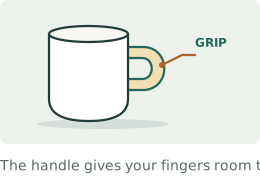
CONCEPT 01
Affordances
The relationship between an object’s properties and a person’s capabilities determines which actions are possible.
-
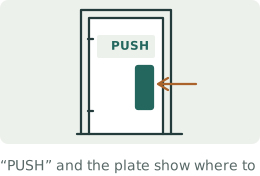
CONCEPT 02
Signifiers
Clear signals should indicate where and how to act.
-
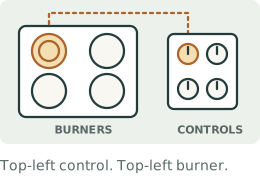
CONCEPT 03
Mapping
Controls should relate spatially or logically to their effects.
-
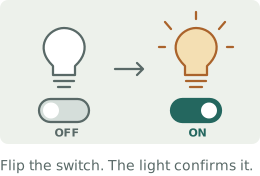
CONCEPT 04
Feedback
Provide timely, perceivable information about an action’s result and the system’s state.
-
CONCEPT 05
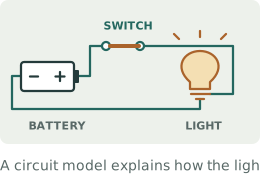
Conceptual models
A design should convey how it works through its structure.
-
CONCEPT 06
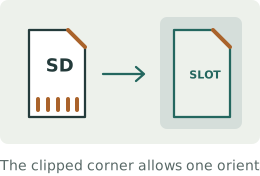
Constraints
Limiting possible actions prevents errors and guides correct use.
Principles of visual perception
Perceptual studies inspired by the work of Wertheimer, Köhler, and Koffka. These principles describe tendencies in how we organize visual information.
-
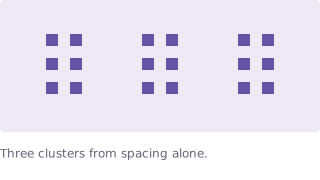
Proximity
Elements near each other tend to be perceived as a group.
-
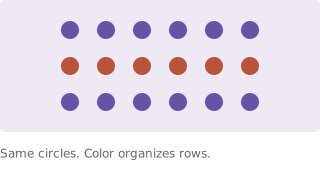
Similarity
Elements that look alike tend to be grouped together.
-
Good continuation
We tend to perceive smooth, continuous paths through intersecting or interrupted contours.

-
Closure
We can perceive a complete form even when portions of its boundary are missing.

-
Figure / ground
We organize a visual field into figures and backgrounds; that relationship can be ambiguous or reversible.

-
Common fate
Elements moving together tend to be perceived as a group.
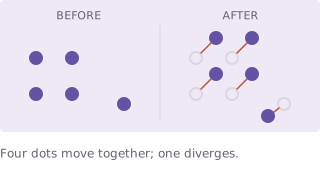
Static snapshots illustrate coordinated movement. -
Prägnanz (simplicity)
Perception tends toward stable, regular, simple organization under the prevailing conditions.

weimar · dessau · berlin
1919—1933
bauhaus
Art. Craft.
Everyday life.
Founded in 1919, the school brought art and craft into dialogue, later emphasizing industrial technology. These themes reflect a diverse, evolving school.
-
Function and form
Let purpose inform form. The earlier phrase “form follows function” comes from Louis Sullivan, in 1896.
-
Reduction to essentials
Unnecessary elements should be removed to reveal core structure.
-
Unity of art, craft, and technology
Design should integrate aesthetics, skill, and engineering.
-
Geometric clarity
Simple geometric forms create order and legibility.
-
Truth to materials
Materials should be used honestly rather than disguised.
-
Design for real life
Design should be practical, reproducible, and accessible to everyday users.
Visual communication
10 selected ideas
Grid
systems.
Müller-Brockmann’s Grid Systems in Graphic Design (1981) offers a systematic approach to arranging type and image. These selected ideas explore that discipline.
-
The grid as structure
An underlying mathematical grid creates order, legibility, and coherence across a composition.
-
Visual hierarchy
Size, weight, and position should establish a clear reading order that guides the eye without confusion.
-
Typographic discipline
Type is not decoration; its proportions, spacing, and alignment carry communicative responsibility.
-
Whitespace as element
Empty space is active and intentional, giving content room to breathe and be understood.
-
Objective communication
Organize information to support clear communication, while recognizing that every presentation involves choices.
-
Constructive reduction
Remove elements that obstruct the message; retain the context and structure people need to understand it.
-
Consistent rhythm
Repeated proportions, spacing intervals, and column widths create visual harmony across a layout.
-
Alignment as meaning
Elements aligned to a common axis are perceived as related; misalignment should be purposeful, never accidental.
-
Typography and image in tension
The relationship between type and image should be deliberate, balanced, and mutually reinforcing.
-
Reproducibility and universality
A visual system should work across scales, formats, and contexts without losing integrity.
Thinking with evidence
Selected principles of information design
Ideas drawn from The Visual Display of Quantitative Information, Envisioning Information, and Beautiful Evidence. Each margin figure is redrawn from a real, published dataset.
-
Above all else, show the data.
Design exists to reveal data clearly and truthfully, not to decorate it.
-
Show comparisons.
Comparisons help readers interpret values, changes, and differences.
-
Show explanation and mechanisms.
Graphics should help explain how and why patterns occur, not merely display correlations.
-
Show multivariate data.
Show multiple variables when they help explain the relationships relevant to the analytical task.
-
Integrate words, numbers, and images.
Explanations, labels, and data should live together in one coherent visual argument.
-
Document sources, methods, and uncertainty.
Credibility requires transparency about data origins, processing, and limitations.
-
Maintain graphical integrity.
Visual representations must not distort quantities, scale, or relationships.
-
Reduce nonessential ink.
Reduce visual clutter when doing so improves understanding; retain useful labels, context, and structure.
-
Use high data density.
Dense displays pack meaningful information into compact space, respecting the viewer's ability to read complexity.
-
Use small multiples.
Repeating the same graphic structure across slices of data invites direct comparison and reveals patterns.
-
Escape flatland.
Use layering, annotation, and contextual depth to add informational dimensions without distorting the data.
Eight perspectives, revisited.
-
Dieter Rams
Make useful, honest products with care for every detail and their lasting impact.
-
IDEO / IDEO.org
Learn with people, make ideas tangible, and improve them through experimentation.
-
Jakob Nielsen
Make interfaces clear, consistent, forgiving, and easy to navigate.
-
Don Norman
Help people understand what they can do, how to do it, and what happened.
-
Gestalt psychology
Use grouping, continuity, and figure–ground relationships to make visual structure legible.
-
Bauhaus
Bring art, craft, materials, and technology into the design of everyday life.
-
Josef Müller-Brockmann
Use grids, typography, alignment, and space to give information a clear order.
-
Edward Tufte
Let evidence lead: show comparisons, preserve context, and explain without distortion.